


Table of Contents
Building a business network usually starts with the router supplied by the internet provider. Additional devices are added gradually: a switch, then another one, then a Wi-Fi range extender. Each purchase addresses an immediate need and makes sense on its own. Together, however, they do not form a cohesive whole.
The problem emerges over time, at the least expected moment. The connection drops during a video call with a customer. The payment terminal loses network access at peak times. Cameras have been added, only to reveal there is no way to power them. This is when the question that should have been asked from the start returns: what equipment does the business actually need, and how can it be connected into a single, working network?
The good news is that you do not need enterprise-class solutions to have a predictable network that can be managed without an administrator. Below, we look at four typical scenarios from a small premises to an office with surveillance and IP telephony, and how to build a network in each using equipment from the HPE Networking Instant On range.
What is HPE Networking Instant On?
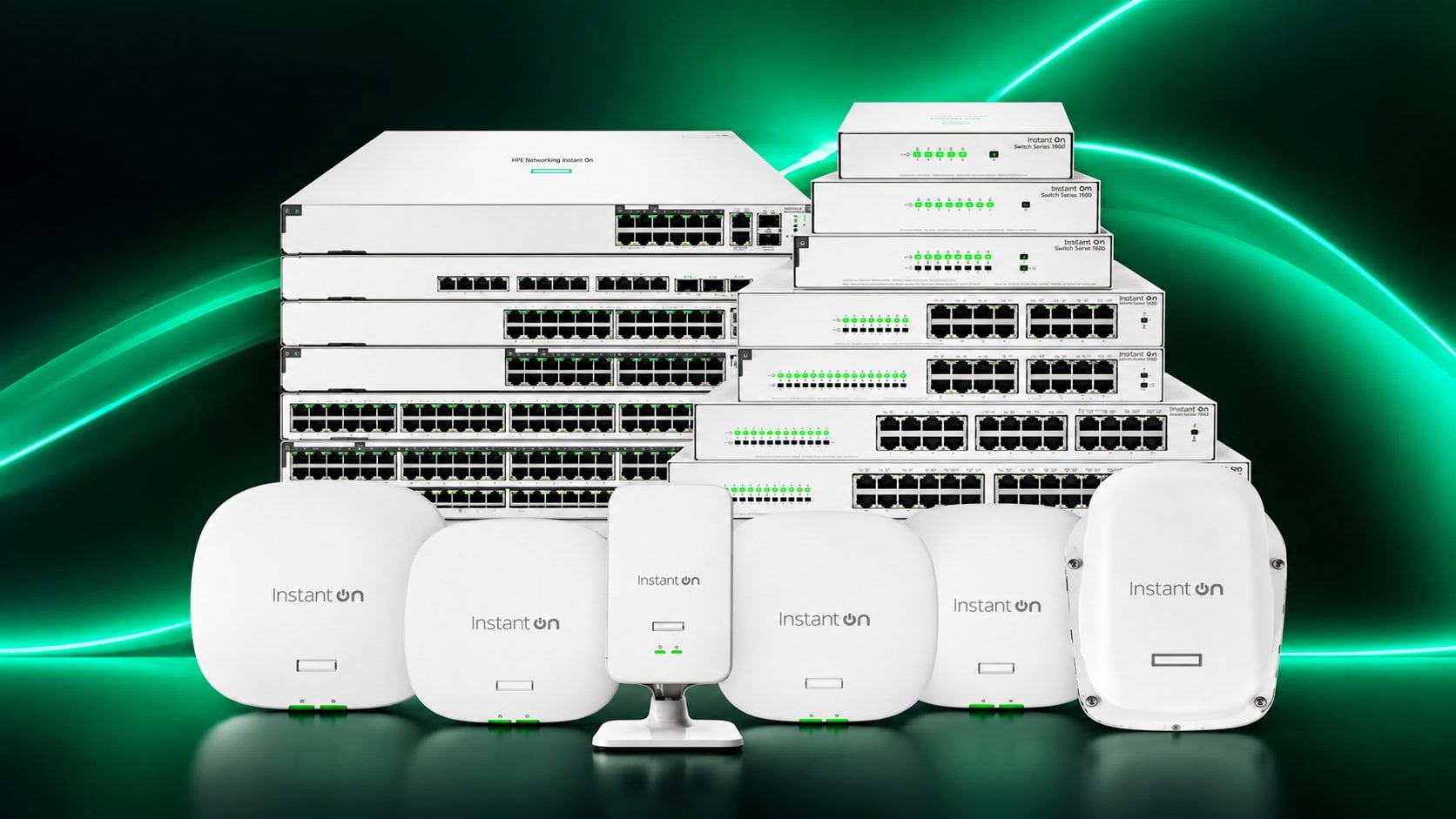
HPE Networking Instant On is a range of HPE networking devices designed for small and medium-sized businesses. It includes switches from the 1430, 1830, 1930 and 1960 series, as well as AP family access points, including the AP21, AP22, AP25 and AP32 models.
In May 2024, HPE renamed the range from Aruba Instant On to HPE Networking Instant On. Some descriptions and materials still use the former branding, but it is the same hardware; only the name has changed.
Switches and access points in one ecosystem
HPE Networking Instant On includes both wired and wireless hardware. Switches and access points from this range work together as standard and operate within a single network, so there is no need to select them separately or check their compatibility.
Management via the app
HPE Networking Instant On networks are managed through the free Instant On app, available on the App Store and Google Play, or through a dedicated cloud portal. Both tools use the same account and provide the same set of features, so the network can be managed from either a phone or a web browser on a computer.
No hardware controller, additional licences or subscription fees are required. A single network can include up to 125 access points and switches.
Deployment in just a few minutes
HPE Networking Instant On devices are configured step by step, following the instructions displayed in the app. Smart Mesh technology makes it possible to connect up to eight access points without installing new cabling, which is important wherever cutting into walls is not an option.
What network for a small office with up to 15 people?
For an office or premises with up to 15 people, one access point and one switch are sufficient. The access point handles wireless traffic, while the switch supports wired devices.
Many businesses of this size ask why they need a separate access point when the router supplied by their internet provider already has Wi-Fi. A router can support a few laptops, but with a dozen or more devices – phones, a printer, a payment terminal and a camera – it becomes a bottleneck. A dedicated access point takes over wireless traffic and handles it more reliably. Its more powerful antennas provide coverage throughout the room, rather than only part of it. It maintains dozens of simultaneous connections without a drop in speed. It also does not handle anything else – at the same time, the router still has to manage the internet connection and wired traffic.
For a small space, the following is sufficient HPE Networking Instant On AP21. The AP21 access point supports up to 50 devices and provides coverage for an area of up to approximately 140 m². It is designed for installations comprising one or two access points.
For the wired side, the choice comes down to two options. Instant On 1430 unmanaged switch simply forwards traffic – plug it in and it works. Instant On 1830 managed switch shows what is happening on the network, lets you segment traffic and respond when something stops working. Businesses planning to grow will usually benefit from choosing the managed version from the outset.
What network does a 20–50-person business need?
For a business with 20 to 50 employees, the foundation of the network is a 24-port PoE switch and two to four access points. At this scale, the network is no longer an add-on but infrastructure, and downtime has a real financial cost.
The core of such a deployment is HPE Networking Instant On 1930 with 24 ports and PoE. PoE, or power delivered over a network cable, solves a problem that often only becomes apparent during installation: the access point is mounted on the ceiling while the nearest power socket is three metres below. With PoE, a single cable supplies both data and power. The JL683B model has a power budget of 195 W, sufficient for several access points and a number of additional devices.
If the business has no devices that require power over the network, consider the non-PoE version. It is fanless, so it operates silently and can be placed in an office rather than in a rack cabinet. It also consumes noticeably less power while offering the same set of management features.
On the wireless side, it is worth distinguishing between two scenarios. For typical office environments, a good choice is HPE Networking Instant On AP22, the most popular access point in this range. For meeting rooms and densely occupied open-plan offices, the better choice is AP25, which supports a higher number of simultaneous connections.
What network does an office with CCTV and IP telephony need?
In an office with IP surveillance and VoIP telephony, the PoE power budget – not the port count – determines the choice of switch. It is a parameter that is usually considered too late.
An IP camera requires anything from a few to more than ten watts. A VoIP phone needs only slightly less. An access point requires another dozen or so. Individually, these are minor demands, but with several dozen devices, the total becomes significant and can be the real constraint.
HPE Networking Instant On 1930 with 48 ports and a 370 W power budget is designed for this scenario. A single device in a rack cabinet can power cameras throughout the premises, desk phones and ceiling-mounted access points.
If many ports are required but power over the network is not, an alternative is the non-PoE version. It is also worth considering backup power: a switch supporting surveillance and telephony should have battery backup in case of a power outage.
What network does a restaurant, hotel or shop need?
In a restaurant, hotel or shop, the network must support two distinct groups: staff and guests. Their traffic should be separated, coverage must be provided where there is no cabling, and devices such as cameras and terminals need to be powered.
A shared network for staff and visitors is a poor solution – not only because of bandwidth, but above all because of security. A till, payment terminal and computer running the sales system should not be on the same network as a random guest’s phone. HPE Networking Instant On separates these two areas as standard: the guest network operates independently, with its own captive portal that can be branded with the venue’s logo.
The second consideration is coverage in locations where cabling has already been installed and no one intends to alter it. Smart Mesh technology lets you add further access points without running new cables – in the dining area, on the terrace or on another floor. For larger premises, AP21 is available in a pack of five, simplifying both purchase and subsequent management.
The third consideration is devices that require power: cameras above the till, terminals and sometimes electronic locks. Here again, a PoE switch.
Which HPE Networking Instant On switch and access point should you choose?
The table below compares HPE Networking Instant On ranges by port count, PoE budget, management method and typical use case.
| Model | Ports | PoE | Management | Best suited to |
|---|---|---|---|---|
| Instant On 1430 8G | 8 | None | None | Very small offices, simple deployments |
| Instant On 1830 8G | 8 | None | Basic | Small businesses that want visibility into their network |
| Instant On 1930 24G | 24 + 4x SFP+ | None | Full | Businesses with 20–50 employees and no PoE devices |
| Instant On 1930 24G PoE | 24 + 4x SFP+ | 195 W | Full | Businesses with 20–50 employees |
| Instant On 1930 48G | 48 + 4x SFP+ | None | Full | Larger offices without PoE devices |
| Instant On 1930 48G PoE | 48 + 4x SFP+ | 370 W | Full | Surveillance, IP telephony, larger offices |
| Instant On 1960 | 12–48 | Up to 600 W | Full, with stacking capability | Businesses planning further growth |
| Instant On AP21 | 1 GbE uplink | PoE-powered | Via app | Small premises, 1–2 access points |
| Instant On AP22 | 1 GbE uplink | PoE-powered | Via app | Standard office spaces |
| Instant On AP25 | 2,5 GbE uplink | PoE-powered | Via app | Meeting rooms, high-density environments |
| Instant On AP32 | 1 GbE uplink | PoE-powered | Via app | Businesses seeking the latest Wi-Fi standard |
The SFP and SFP+ ports available in the Instant On 1930 series are used for fibre connections – between floors, buildings or to the server room. They require a compatible transceiver, but provide headroom for the future even if they are not currently in use.
Day-to-day network management
The Instant On app mentioned earlier is responsible not only for initial setup, but also for ongoing network management. For a small business, the question of day-to-day management is more likely to determine a purchase than any technical specification.
A single screen shows which devices are connected, how heavily the network is being used and what has stopped working. New hardware can be added by scanning the code on the device. A guest network can be enabled with just a few taps, and you can also set its availability hours – for example, disabling Wi-Fi for visitors outside business hours – and block selected website categories.
Software updates are installed remotely, and faults can be viewed from a phone wherever the business owner happens to be.
Specialist expertise will still be needed for more substantial network expansion. However, for day-to-day management in a company with several dozen employees, the app alone is sufficient – and that is the key benefit of this product line.
Frequently asked questions
Is HPE Networking Instant On the same as Aruba Instant On?
Yes. HPE Networking Instant On is the current name of the product line formerly known as Aruba Instant On. Only the branding has changed; the hardware and management approach remain the same.
Does Instant On network management require a subscription?
No. The mobile app and browser portal are available with no subscription fees or additional licences. No hardware controller is required either.
How many devices can a single Instant On network support?
A single HPE Networking Instant On network can include up to 125 devices. Smart Mesh technology allows up to eight access points to be connected without installing additional cabling.
Which switch should you choose for a company with 30 employees?
For a company of this size, a 24-port PoE switch is a typical choice, for example the Instant On 1930 (JL683B) with a power budget of 195 W. It can power access points, cameras and VoIP phones over the network cable.
What is the difference between a managed and unmanaged switch?
An unmanaged switch forwards traffic without any configuration options – simply plug it in and it works. A managed switch lets you monitor network status, separate traffic into distinct segments and diagnose issues. In the Instant On range, unmanaged models are the 1430 series, while managed models are the 1830, 1930 and 1960 series.
Does an Instant On access point require a separate power supply?
Instant On access points can be powered via PoE, meaning through a network cable connected to a switch with this capability. Alternatively, a mains power adapter, available as a separate accessory, can be used.
Summary
A network should be selected not according to company size, but according to the number of devices that will use it and what needs to be powered. Twenty employees with laptops have entirely different requirements from twenty employees, ten cameras and IP telephony.
The starting point is to count the devices – both those already in use and those planned for the next few years. Everything else follows from that number.
The full HPE Networking Instant On range is available in the HPE networking equipment category. If you are unsure which hardware to choose, contact our advisers – they will help tailor the configuration to your specific site.
This article was created in partnership with HPE.
